Verify at the till
For physical stores. The cashier does not need to see the customer’s phone or open the bank’s app: they type the last digits of the reference and the amount, and the screen tells them whether the payment arrived.
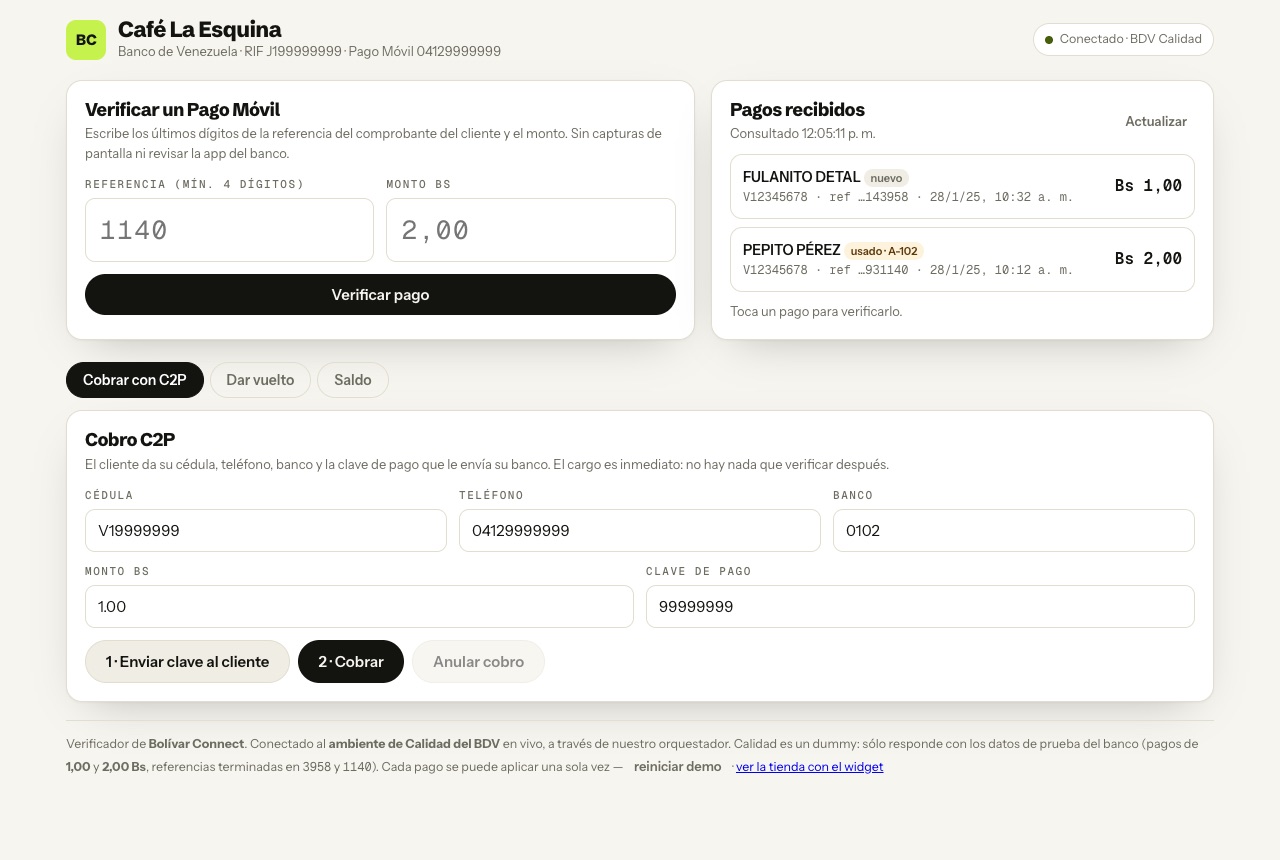
It works in any browser: a computer at the counter, a tablet or the manager’s
phone. In the test environment it is at /demo/verificador. The till’s
interface is in Spanish; the button and section names below are given as they
appear on screen.
What the cashier sees
Section titled “What the cashier sees”Verify a Pago Móvil. Last 4 digits of the reference and amount. The answer is one of those in how a payment is verified: approved, already used, different amount, ambiguous or not found.
Pagos recibidos (payments received). The account’s Pago Móvil credits, with the name and national ID of whoever paid, refreshed every 15 seconds. Tapping one fills in the verification. The ones already applied appear marked with the order they were used for, whether they came from the till or the web: there is a single record per merchant.
Collect with C2P. The cashier asks the customer for their national ID, phone number and bank, and presses “Enviar clave al cliente” (send PIN to the customer). The bank sends them the payment PIN, the customer reads it out, and the charge is immediate. If there was a mistake, the charge can be voided.
Give change. A Pago Móvil from the merchant’s account to the customer. If the merchant has several enrolled accounts, the source phone number decides which one it comes from. “Confirmar con el banco” (confirm with the bank) asks BDV whether the change arrived.